Showing posts with label SharePoint 2007. Show all posts

Tuesday, August 30, 2011

Removing the OOB categories from the web part tool pane

Often while developing custom web parts for SharePoint 2010 or MOSS, sometimes it is required to hide the OOB tool pane (for e.g. Appearance, Layouts or Advanced) from the end user.

Trying for hours and scratching my head, I could not find any elegant way to achieve this. Finally I decided to use a hack via reflection.

In my custom editor part class on the CreateChildControls() method, I am calling a method HideOtherToolParts. The HideOtherToolParts iterates over the control collection for this editorpart and checks if the type of the child control is Microsoft.SharePoint.WebPartPages.WebPartToolPart and accordingly hiding that child.

        protected override void CreateChildControls()
        {
            base.CreateChildControls();
            try
            {
                this.HideOtherToolParts(this.Parent.Controls);
                //other operations
            }
            catch
            {
                throw;
            }
        }

        private void HideOtherToolParts(ControlCollection controls)
        {
            try
            {
                foreach (Control toolPart in controls)
                {
                    if (toolPart.GetType().FullName == "Microsoft.SharePoint.WebPartPages.WebPartToolPart")
                    {
                        toolPart.Visible = false;
                    }
                }
            }
            catch
            {
                throw;
            }
        }

Hope this helps!

Sunday, August 1, 2010

Duplicate name error while creating SharePoint publishing page instance

Most of the time you would always find some or the other issues while deploying your solution components from dev environment to any other environment like authoring or staging.

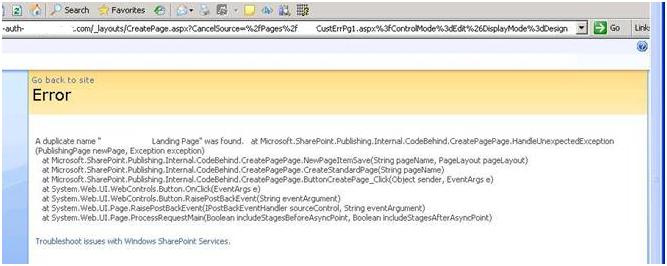
A couple of days before, we encountered one such issue while creating page instances using our custom content types on authoring environment. The error we encountered was

A duplicate name “YOUR CONTENT TYPE NAME” was found. at Microsoft.SharePoint.Publishing.Internal.Codebehind.CreatePagePage.HandleUnexpectedException(PublishingPage newPage, Exception exception)….

Also this error also wouldn’t even let the content deployment job to succeed.

pageinstanceerror

After scratching my head for a couple of hours I finally found the issue/resolution and thought to share the same with the community.

The issue circles around the Content Type Association feature which we leveraged to binds our custom content type instance with the MOSS Pages library.

Background:

The content types we created for sprint 1 inherited from MOSS Page content type and accordingly they we associated them with the designated page layouts, packaged and deployed on authoring environment.

Everything worked fine here!!

Later in Sprint 2, due to some change in the customer requirement we had to update our custom content types to inherit from a different content type – ABC content type (provided by the customer). So accordingly we updated the IDs for all the content type but rest of the properties (like Name) remained same. This update was again packaged and redeployed on authoring environment.

The above error occurred!! 

Root Cause:

Now once you redeployed a branding WSP, it would first delete the existing site content types and columns and other stuff but!! it won’t update the content type associations which are already there with the Pages library (at least for the content types having the same names). So our content types instances (apparently stale) in Pages library continued to inherit from Page content type instead of ABC content type. And here we ended up with two versions of content types with duplicate names.  

Solution:

Just delete the stale content type instance from the Pages library before you redeploy the new package and everything should work fine. Simple isn’t it J

Friday, July 23, 2010

Duplicate web parts shown in SharePoint publishing page layouts and page instances


Recently I came across another interesting issue with SharePoint page layouts. For a project requirement, we created some page layouts with almost the same structure having couple of predefined web part zones. Further each web part zone had a predefined Content Editor Web Part (CEWP). After packaging the same, I deployed the WSP on our test environment.

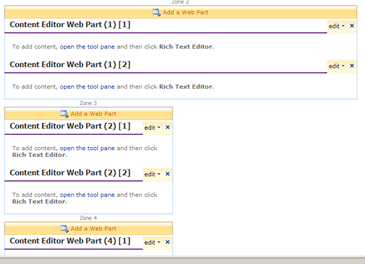
As pictures speak more than words, the screen grab below (left most) depicts the issue I encountered. When creating a page instance using any of our custom page layout, every web part zone showed duplicate CEWP web parts instead of just one CEWP.

Page instance in edit mode

  Page layout in SPD

Inspecting the page layouts in SharePoint Designer (SPD) resulted in the screen grab above (right most). The same duplicate web part appeared on the design mode.

At first I tried to repackage and redeploy the page layouts a couple of times thinking this would solve my issue, but was disappointed. Again, everything worked fine on the development environment where the page layouts were designed and created. It’s only when I packaged and deployed the page layouts via WSP and features this issue would show up.

I finally started inspecting the markup of the page layouts and found something interesting. I did a search for the web part zone GUIDs in SPD and below is the result of the query.

The result showed 82 occurrences of the same web part zone GUID in our custom page layouts (highlighted in yellow)!!.

 SPD GUID search result


Apparently what happened was the designer had taken the advantage of the fact that all the page layouts had almost the same structure and used the magic keys (CTRL+C & CTRL+V) to create them J

Issue:
Using the same web part zone GUID multiple times whether in same page layout or a different  page layout would result into the web part being shown up multiple times.

Resolution:
Ensure that every web part zone and web part in your page layouts have a unique GUID across your site collection.

Tuesday, January 12, 2010

SharePoint WCM Feature Generator

From my experiences on of SharePoint WCM projects I did so far, I came across certain repetitive & time-consuming development tasks. Some of them are listed below:

1. Creating Site Definition

2. Features

· Site Columns- Columns used in lists/libraries/page layouts.

· Content Types- Lists/Page Layout content types.

· Content Type Associations- Association of Content Types with the SharePoint list.

· Master Pages and Page Layouts- Provisioning master pages and layouts on SharePoint master pages library.

· Provision Files- Provision image, CSS, XAPS and documents on specified SharePoint library.

· Feature Staplers- Auto activation of features based on site creation.

3. Feature Receivers

4. Custom Controls

The image below illustrates the Visual Studio 2005/2008 solution for a typical SharePoint WCM project.

VSSolution

Keeping the same thought in mind, I have developed a utility SharePoint WCM Feature Generator to automate the feature creation for some of the fundamental WCM components in SharePoint like Site Columns, Content Types, Content Type Associations, Provisioning etc (indicated by green callout).

SharePoint WCM Feature Generator

Also this tool well integrate with Visual Studio to make things even simpler.

The SharePoint WCM Feature Generator is targeted for both Microsoft Office SharePoint Server 2007 and SharePoint 2010.

The tool can be downloaded from here: SharePoint WCM Feature Generator.exe

The user guide can be downloaded from here: SharePoint WCM Feature Generator User Guide